
FUTURE-READY EXCEL: From Basics to Brilliance - Session 1: Handling Data – Cleaning and Reconciling
-
Presenter: Renier Wessels and Michael van Schalkwyk
-
Level: Advanced
-
Study time: 1 Hour
-
Date: 26 May 2026
08:00 - 09:00
Write your awesome label here.
Course overview
When working with client data, financial professionals often receive raw datasets that require significant preparation before they can be analysed or used in reporting. This first session in the Future-Ready Excel series focuses on the essential steps required to transform raw data into a clean, structured dataset that can be reliably used in the financial workflow.
Using a practical case study based on a fictitious small business, Mama Rita’s Bakery, participants will learn how to approach incoming data methodically. The session will begin with a quick data audit checklist to identify common issues such as duplicates, blanks, incorrect data types, outliers, and formatting inconsistencies. Participants will then explore several built-in Excel tools — including Remove Duplicates, Text to Columns, Flash Fill, TRIM/CLEAN/PROPER functions, Find & Replace, and Conditional Formatting — to quickly resolve common data problems.
A key highlight of the session will be an introduction to Power Query, a powerful yet under-utilised feature in Excel that enables users to import, clean, transform, and structure large datasets efficiently. Participants will see how to bring in data from multiple sources, perform common transformations, and create a clean “Stage 1” dataset, while preserving the original raw data.
The session will also cover basic aggregation and reconciliation techniques, particularly when working with larger datasets. By the end of the webinar, participants will have a practical framework for preparing client data in Excel, ensuring it is accurate, well-structured, and ready for further financial analysis.
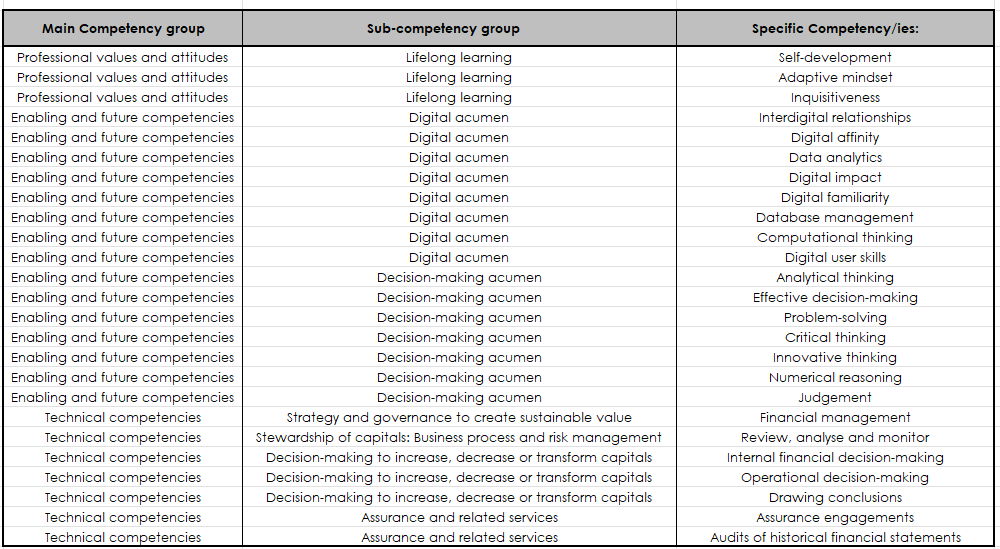
In completing this learning engagement, you will have developed the following professional competencies indicated in the green section below:
Using a practical case study based on a fictitious small business, Mama Rita’s Bakery, participants will learn how to approach incoming data methodically. The session will begin with a quick data audit checklist to identify common issues such as duplicates, blanks, incorrect data types, outliers, and formatting inconsistencies. Participants will then explore several built-in Excel tools — including Remove Duplicates, Text to Columns, Flash Fill, TRIM/CLEAN/PROPER functions, Find & Replace, and Conditional Formatting — to quickly resolve common data problems.
A key highlight of the session will be an introduction to Power Query, a powerful yet under-utilised feature in Excel that enables users to import, clean, transform, and structure large datasets efficiently. Participants will see how to bring in data from multiple sources, perform common transformations, and create a clean “Stage 1” dataset, while preserving the original raw data.
The session will also cover basic aggregation and reconciliation techniques, particularly when working with larger datasets. By the end of the webinar, participants will have a practical framework for preparing client data in Excel, ensuring it is accurate, well-structured, and ready for further financial analysis.
In completing this learning engagement, you will have developed the following professional competencies indicated in the green section below:
What's included?
-
1 Live event
-
1 Quiz
-
1 Certificate
Excel series
Link with SAICA Competency Framework

Copyright © CPD Campus (Pty) Ltd 2024